l123
What it is
Section titled “What it is”l123 is a faithful recreation of the Lotus 1-2-3 Release 3.4a for DOS (1993) interaction model running on top of a modern Rust spreadsheet engine. It is, by some distance, the single best keyboard-first interaction-model reference in this entire inspiration corpus — built around an Authenticity Contract (docs/SPEC.md §1) that makes two promises: “(1) an experienced 1-2-3 R3.4a user can drive l123 cold, without reading anything; (2) files round-trip cleanly to and from .xlsx.” Every commitment downstream of those two sentences is non-negotiable, locked by 232 acceptance transcripts.
What it ships that KN-86 should learn from, in concrete detail:
- Slash menu (
/) — the entire command surface lives behind one keystroke. Type/to enterMENUmode; first letter descends into a menu item;Escbacks out. No mouse hunt, no command palette fuzzy match, no menu bar consuming chrome. :menu (WYSIWYG) — a second mode for the WYSIWYG icon panel, distinct from/. Two keys = two top-level command hierarchies.- Three-line control panel — three lines at the top of the screen carry, top-to-bottom, (1) current cell address + content + format, (2) menu prompt or first-character entry buffer, (3) menu hint / submenu description. Always visible. The control panel is the only chrome; everything else is grid.
- 13 modes shown in a live mode indicator —
READY,LABEL,VALUE,EDIT,POINT,MENU,FILES,NAMES,HELP,ERROR,WAIT,FIND,STAT. The indicator is in the top-right of the screen at all times. The user always knows what mode they’re in. - First-character input rule — in
READYmode, the first character typed decides whether the entry becomes aLABELor aVALUE. Digits and+ - . ( @ # $start a value; anything else starts a label (with auto-inserted'prefix)."/^/\-are special: right-align, center, fill-with-dashes. Zero modal switching for the most common interaction. - F-key workflow —
F1context help,F2edit cell,F3list named ranges,F4cycle$absoluteness in a reference,F5GOTO,F7repeat last query,F8repeat last table,F9recalc,F10graph view. PlusAlt-F2step,Alt-F3run macro,Alt-F4undo,Alt-F5learn. Every F-key is a verb. Ctrl-Breakaborts from anywhere toREADY. Universal escape hatch.- Optional DOS / phosphor / amber CRT themes — the README explicitly lists a
dostheme (black-on-cyan headers) shipping today, with green and amber CRT themes called out as “stretch.” - Strict layered Rust architecture —
l123-core(types only) →l123-parse, l123-menu→l123-engine(wraps IronCalc behind a trait) →l123-cmd, l123-io, l123-graph, l123-print→l123-ui(ratatui + crossterm, engine-agnostic) →l123(binary). The UI layer never sees IronCalc types; the engine is swappable. - R3.4a WYSIWYG icon panel — 17 icons, mouse-wired, hover hints. Even the icon panel honors the keyboard-first model: every icon is reachable via the
:menu without touching the mouse. - Macros —
/Xlegacy commands,{BRANCH},{IF},{LET},{PUT},{GETLABEL},{GETNUMBER},{MENUBRANCH},{QUIT},{?}pause,{BEEP}, special-key tokens, subroutines,\0autoexec. The user can program the application from inside the application. - F1 context help — the full 1-2-3 R3.1 reference manual (824 pages) is shipped inside the binary, context-aware per mode. Press F1 in EDIT and you land on the EDIT chapter.
Aspirational features for KN-86 — in depth
Section titled “Aspirational features for KN-86 — in depth”This is the single richest source in the batch. The list below is correspondingly long.
Interaction model
Section titled “Interaction model”- Slash-menu as the universal command surface for KN-86 carts. Borrow
/(or pick a different lead key — KN-86’s TERM key is a strong candidate) as the single entry point into a menu hierarchy. First-letter-descent,Esc-back-out, no chords. Strongest single capture from l123. - Three-line control panel maps onto Rows 0 / something / 24. KN-86 already has Row 0 (firmware status) and Row 24 (firmware action bar) as canonical chrome. l123’s control panel is three lines because the application needs three lines worth of context (cell + entry + hint). KN-86 should consider whether the firmware chrome needs to grow to two rows top + one row bottom, or two rows bottom + one row top, when in cart-edit or REPL-edit contexts. Open question.
- Live mode indicator. KN-86 should consider a small mode indicator in Row 0 or Row 24 —
READY/EDIT/MENU/WAIT/ etc. Especially valuable for the nEmacs REPL context-polymorphic dispatch (ADR-0016). - First-character input rule is genuinely brilliant. Whatever the user types first in a context-free input field decides what they’re doing — no “press E for edit mode, then start typing” two-step. KN-86’s TERM-line input should consider the same idiom: first character decides whether the entry is a verb (English imperative parser, Zork-style — see zork.md), an expression (REPL, KEC Lisp), or a navigation hint (cell address / mission ID / cart ID).
- F-key workflow. Every F-key is a verb. KN-86’s 14 function keys + TERM are already in this lineage (ADR-0016 / ADR-0022). l123 is the strongest contemporary reference for how to design that surface to maximize the verb-per-key density.
Ctrl-Breakas universal abort. KN-86 should reserve one key (a TERM-modifier chord, or a dedicated key role) as the universal abort. From any mode, back toREADY. Don’t make the user remember three different exit affordances per surface.
Theming
Section titled “Theming”- The
dostheme (black-on-cyan headers) is shipping today; thegreenandamberCRT themes are stretch. KN-86 is in the same naming territory. l123 directly validatesamberas a sanctioned named-theme keyword across the Charm/Ratatui-adjacent ecosystem.
Authenticity contract
Section titled “Authenticity contract”- The hardest discipline to copy and the most valuable. l123 commits to a two-sentence contract and then writes acceptance transcripts that enforce it. KN-86 should write its own authenticity contract — one or two paragraphs in
docs/software/runtime/— and back it with acceptance transcripts underruntime/tests/. The transcripts lock the deal.
Architecture
Section titled “Architecture”- Layered Rust workspace with strict directional dependencies. The l123 layering —
core → parse/menu → engine → cmd/io/graph/print → ui → binary— is a strong reference for how the KN-86 runtime should be organized. Even though KN-86 is C (not Rust) for the runtime, the directional-dependency discipline is language-independent: the UI layer never sees the engine type; the engine is swappable behind a trait. KN-86 should similarly layer: types → parsers → Fe VM → NoshAPI → UI → binary, with every arrow one-directional. Enginetrait wrapping IronCalc. Means the spreadsheet engine is replaceable without touching UI code. KN-86’s analog is NoshAPI as the trait between cart Lisp and the runtime (ADR-0005). The principle is the same: hide implementation behind a stable trait/ABI.- Engine-agnostic UI. The UI doesn’t know whether the engine is IronCalc or hypothetical-other-engine. Means tests don’t need a real engine, means the UI can render against a mock engine, means the engine team and the UI team aren’t blocked on each other. Direct lesson for KN-86 emulator + nOSh runtime separation.
F1 context help shipped in the binary
Section titled “F1 context help shipped in the binary”- 824 pages of reference manual inside the binary, context-aware. Press F1 in
EDIT, land in the EDIT chapter. KN-86 has a candidate help-overlay pattern called out in Batch 1 (Perkins’?overlay); l123 is the precedent for context-sensitive help — not just “here are the keys,” but “here is the manual chapter for the mode you’re in.” Worth promoting as a runtime affordance ahead of v0.1.
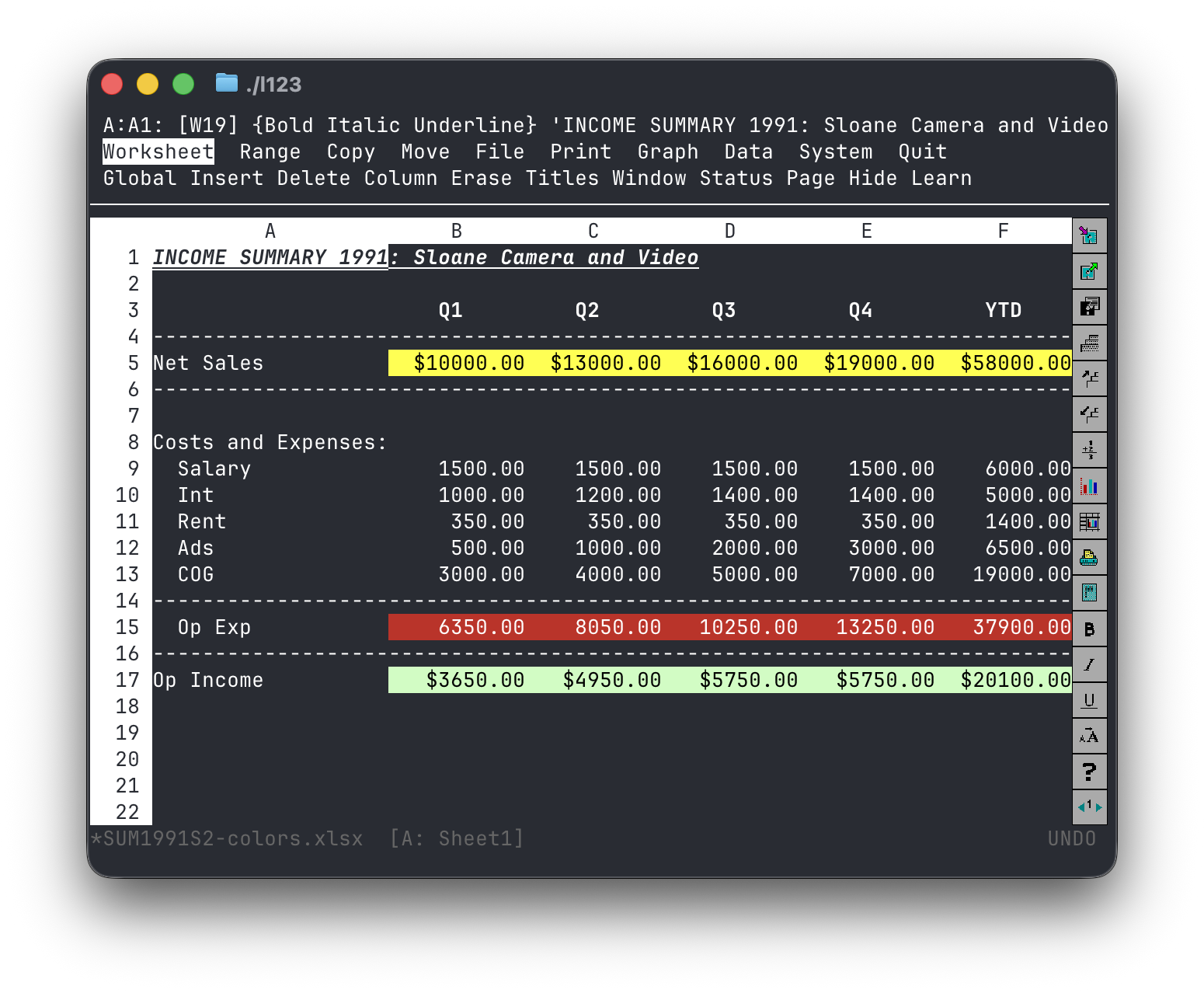
Source: l123 docs/iterm-screenshot.png. Shows the three-line control panel at the top, the mode indicator in the top-right (READY), the grid below, and the WYSIWYG icon panel. The amber-blue color scheme is iTerm’s; l123 ships its own theme registry under --theme.
- Direct citation in the v0.1 ship list. l123 is the single strongest reference for how to organize KN-86’s keyboard-first interaction model. Promote at least three patterns (slash-menu, mode indicator, F1 context help) to v0.1 spec / ADR work.
- Cross-link visicalc-archive.md — l123 is the modern recreation of the same software lineage VisiCalc started. Both are in the cite stack.
- Cross-link zork.md — same era, same keyboard-first commitment, different domain. The two together are the historical-software inspiration anchors.
- Reading the
docs/SPEC.mdanddocs/PLAN.mdfiles in the l123 repo is high-value. The PLAN doc structures M0–M13 milestones; the SPEC carries the authenticity contract. Both are reference templates for how KN-86 could organize its own milestone planning + spec corpus. - One of the four Batch-3 north stars (see index.md synthesis).