Perkins
Tech stack: Go License: (see repo) Serves: runtime / engineering (assigned by Josh; see cart map)
What it does
Section titled “What it does”Perkins is a terminal pixel-art editor that draws with braille characters — eight dots per cell — to get sub-cell resolution inside an otherwise standard text grid. Input is a vim-motion + mouse hybrid; an in-app help overlay (?) is the canonical place to learn the bindings; and there’s a built-in image→ASCII path so the user can paste raster art straight in and edit it as braille pixels. It’s a small but pointed UX study in “how to break the cell grid without leaving it.”
Applicability review (2026-07-29)
Section titled “Applicability review (2026-07-29)”The braille recommendation below was written 2026-06-06 and has since been overtaken. The
? help overlay survives the review as the one borrowable idea, and it has grown more
valuable as the deck accumulated surfaces. Details in “Notes / open questions”.
Aspirational features for KN-86
Section titled “Aspirational features for KN-86”-
Braille rendering for sub-cell resolution.
The right answer for CIPHER-LINE waveforms, sparklines, and map detail.Superseded. Every cited use case shipped a different answer between the capture date and 2026-07-29:- Sparklines.
ui/sparkline(ui/ui/data.lsp) draws time-series through the vertical-bar ramp0x96–0x9D, eight sub-cell steps. - Sub-cell resolution generally. The soft-glyph plane
(ADR-0052) gives sixteen mutable 8×8
slots, a full 64 pixels per cell, rewritable per frame. Braille offers 2×4. The
half-block canvas (
render/half-block-*) adds a 128×150 addressable surface. - CIPHER-LINE waveforms. The OLED carries a pixel tier (GWP-728): free-pixel primitives over the raw 256×64 framebuffer. Direct pixel addressing is finer than any glyph encoding.
- Map detail.
maps.mdspecifies terrain through soft-glyph plus Code Page.
A cost also stands against it. Braille occupies 256 contiguous code points (U+2800–U+28FF), and the Layer-1 code page holds 256 slots, fully allocated (
character-set.md). Braille consumes the entire font, so it lands only in the Layer-2 ~2,000-glyph subset, which widens the text buffer fromuint8_ttouint16_t. - Sparklines.
-
In-app help overlay (
?). A single keypress brings up everything available on the current surface. Confirmed and promoted 2026-07-29, designed atsoftware/runtime/help-overlay.md. The deck now runs 19 programs plus 7 system libraries with their ownon-key, and carries no binding-discovery affordance at all. -
Image → ASCII conversion. Not a likely v1 KN-86 feature, but the idea (a sprite import pipeline that maps raster art into the CP437 glyph budget) is a viable cart-author tool. Sits naturally next to the existing 8×8 glyph tooling.
-
Vim-motion + mouse hybrid. Mouse is irrelevant on KN-86 hardware, but the principle (“two muscle-memory inputs, neither forced”) translates: arrow keys + numpad-as-cursor for KN-86’s no-mouse environment.
UX / interaction patterns
Section titled “UX / interaction patterns”- Braille glyphs as drawing primitives. Each cell is treated as a 2×4 dot matrix; user presses paint a dot, not a cell.
?opens a modal help layer. Discoverable, always available, doesn’t pollute the chrome.- Vim motions for navigation, mouse for direct placement. Power users keep their hands home; casual users point and click.
Visual style
Section titled “Visual style”- Braille mosaic as the canvas. Sub-cell pixel grid that still respects the underlying text-mode constraints.
- Minimal chrome. The drawing area is the UI.
Screenshot
Section titled “Screenshot”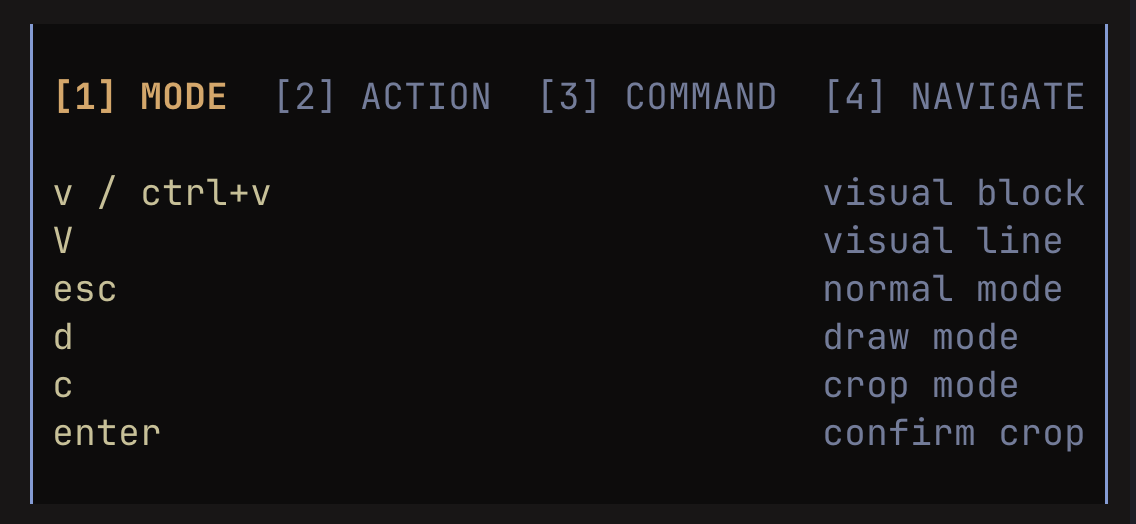
The shot in place is the ? help-menu view — useful because it shows both the braille canvas (in the background) and the in-app help overlay pattern that’s the strongest borrowable affordance.
Notes / open questions for KN-86
Section titled “Notes / open questions for KN-86”-
Braille rendering is the single biggest borrowable trick here.Retired 2026-07-29. No ADR is owed. Per the applicability review above, the half-block canvas, the soft-glyph plane, and the OLED pixel tier cover every proposed use case at finer resolution than braille’s 2x4, and the encoding would consume the entire Layer-1 code page. -
A universal
?help overlay is a strong candidate firmware-internal feature alongside the Bare Deck Terminal and REPL. Cart authors register a help table; firmware composes them. Promoted 2026-07-29 tosoftware/runtime/help-overlay.md. Two findings shaped that design. The overlay mechanism already exists and is generic:screen_router_overlay_toggletakes a screen name, built for the REPL drop-down under ADR-0053. The help-table vocabulary already exists too, as the Row-74 action-bar alist of("KEY" . "label")pairs. -
The image to ASCII conversion is an authoring-tool inspiration; it belongs in
tools/later, alongsidetools/gen_font_12x24.py. -
The editor framing is a red herring for borrowing. Both surviving ideas are independent of editing. One editing connection does hold: the soft-glyph plane’s sixteen 8x8 slots are hand-authored as decimal byte tables today, and Perkins is the direct precedent for a soft-glyph editor that emits them. That belongs in
tools/or a workbench.